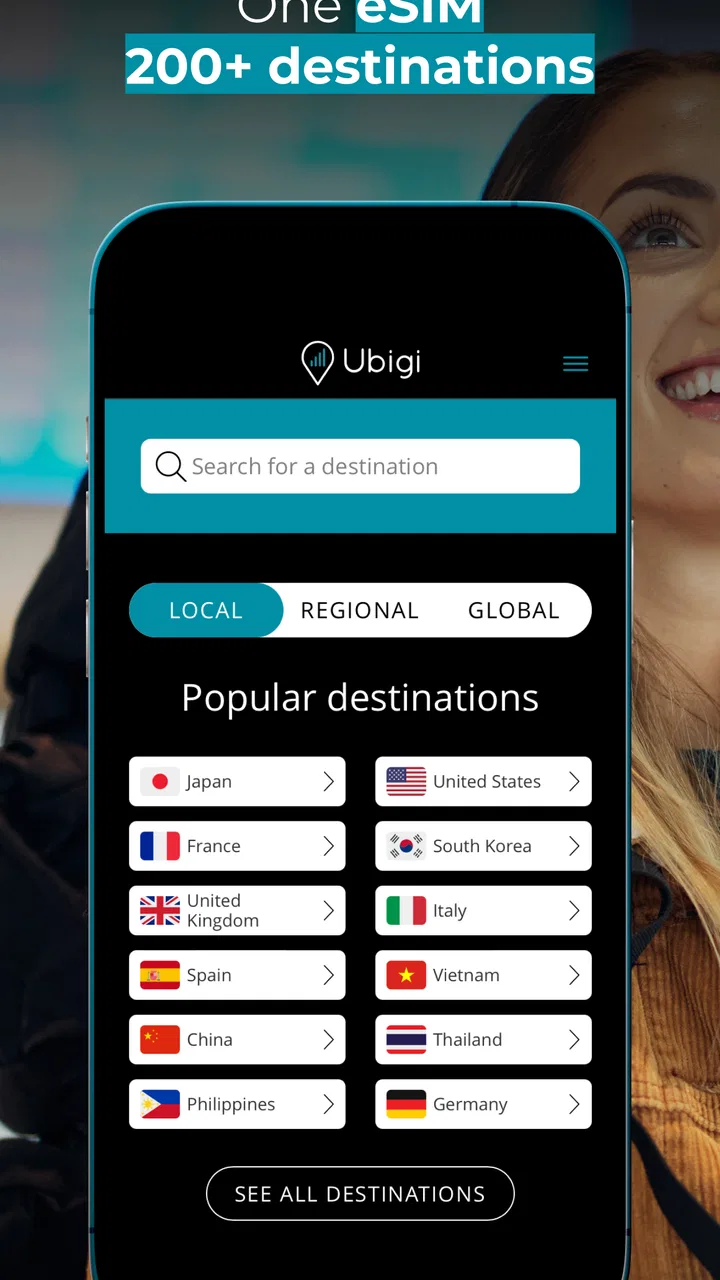
Ubigi: Travel esim mobile data
- 3.7
- Rating
- 1.00M
- Installs
- Free
- Price

 Analysis by App-foxy
When I travel, the first thing I want to solve is mobile data. Maps, translation, transport apps, messages, and booking confirmations are not luxuries once I am somewhere unfamiliar. Ubigi approaches that problem as a travel eSIM app from Transatel, giving me a way to arrange a mobile data plan without relying immediately on a physical SIM or accepting ordinary roaming charges. It is free to install, aimed at everyone, and sits in the Travel & Local category.
My overall impression is that Ubigi is most useful when I treat it as a preparation tool rather than a magic connectivity button. The app can make arriving in another country less stressful, especially if my phone supports eSIM and I set everything up before leaving home. The experience still depends on the phone, the destination, the selected plan, and the available network, so it is not a universal replacement for every carrier or local SIM. That distinction matters more than the simple promise of staying connected.
How Ubigi feels in real travel situations
I find that the most useful way to judge Ubigi is to separate the app’s role from the phone and network it relies on: it can make travel data easier to arrange, but it cannot remove every setup decision. In the next section, I look at the choices a traveler can make before departure, especially how a little preparation can reduce confusion when mobile access matters most.
You May Also Like

 Blood Strike: 2.5 Anniversary
Blood Strike’s Loadouts Turn Every Drop Into a Tactical Gamble
A close look at Blood Strike’s custom loadouts: how fast access to signature weapons reshapes its battle royale rhythm, rewards preparation, and narrows the gap between fights.

 Pandora - Music & Podcasts
Pandora’s Music Is Easy to Start, but Harder to Recover
Pandora’s strength is its low-effort path from a seed to a station. Its weak spot is how much confidence it asks you to place in connection, setup, and quiet recovery.

 8 Ball Pool
 Is Built on Rivalries, Rematches, and Routine
A close look at the rivalries, rematches, shared routines, and unanswered safety questions that turn a quick pool match into a persistent mobile community.

 Samsung Music
’s Quiet Strength Is Playing What You Already Own
Its reach comes less from spectacle than from dependable access to a personal library. That simplicity is both the app’s strongest retention engine and its ceiling.

 AccuWeather: Weather Radar
AccuWeather Review: A Quick, Clear Forecast for Everyday Decisions
For everyday plans, the best forecast is the one you can understand quickly. AccuWeather makes rain timing, radar, and local conditions easy to act on, with a few trade-offs.

 Hill Climb Racing
Why Hill Climb Racing Still Turns Crashes Into One More Run
A tiny car, a bumpy hill and one more upgrade: Hill Climb Racing keeps resurfacing because its simple chaos makes every near-miss feel personal.
More From Our News Desk



Speed expectations before and after landing
The app’s store summary focuses on virtual eSIM access for internet and mentions connection to 5G with a data plan. I would read that as a capability rather than a guarantee that every trip will run at 5G speed. A fast connection depends on local coverage, network congestion, the handset, and the plan available for the place I am visiting. In a strong coverage area, the practical experience should be enough for ordinary travel tasks: checking a route, sending photos, translating a sign, calling a ride, or opening a reservation.
What I like about this approach is the separation between the travel connection and my regular phone number. I can keep my usual SIM available for calls or messages while using the eSIM for data, provided my device handles that arrangement correctly. That can be more convenient than removing a physical SIM at an airport, where a tiny card is easy to lose and a SIM tool is rarely close at hand.
For heavier activity, I would keep expectations sensible. Video calls, cloud backups, long video streams, and large app downloads can consume a plan quickly and may expose any weakness in the local network. Ubigi is better suited to controlled, purposeful use than to assuming I have unlimited home broadband in my pocket. I would download offline maps, podcasts, and entertainment before departure, then use the connection for the things that genuinely need live access.
A useful habit is to check which line is selected for mobile data after installation. On a dual-SIM phone, the eSIM can be present but not actually carrying data if the device continues to prefer the original line. I would also disable automatic switching to the other line when possible, because an otherwise helpful phone setting could send traffic through the home carrier and create roaming charges. The important lesson is that the app handles the eSIM side, while the phone’s own SIM controls still deserve attention.
Heavy-use moments where planning matters
The most demanding moment is often not sightseeing but arrival. I may need airport directions, a transport app, a message to a host, and a digital boarding or booking document within a short period. That is exactly when I would want the eSIM already installed and the plan ready. If I wait until I am standing in a crowded terminal, dealing with weak public Wi-Fi and low battery, even a straightforward setup can feel more difficult.
I would install the app and prepare the eSIM while I still have dependable Wi-Fi. That does not mean I should activate a destination connection weeks early without checking the plan conditions; it means I should complete the parts that can safely be completed in advance and understand the activation instructions. Keeping the email or account details associated with the purchase accessible offline is also sensible, since the first connection may be needed to finish the process.
For a work trip, I would be more cautious. A stable connection for email and messaging is one thing; depending on it for a full day of video meetings is another. I would identify a backup location with Wi-Fi and avoid scheduling important calls immediately after landing. Ubigi can reduce roaming friction, but it cannot remove the variables created by a busy local network or a destination with uneven coverage.
There is also a less obvious trade-off with data-heavy travel habits. Automatic photo synchronization, operating-system updates, and social media video can quietly use the allowance while I am focused on navigation. Before departure, I would review background data settings and postpone large updates. This is not a special Ubigi feature; it is the practical discipline needed to make any travel data plan last longer, and it is particularly important when the eSIM is intended for a short trip.
Sharing the connection with another device is another situation where I would avoid assumptions. A phone may support hotspot use, but the usefulness of that arrangement depends on the handset, the plan, and the local network. If I need a laptop connection for work, I would test hotspot behavior at home rather than discovering a limitation in a hotel room. For a family that expects several people to stream or upload constantly, a local SIM, dedicated router, or carrier package may be a better fit.
Reliability and recovery when the connection misbehaves
The appeal of an eSIM is partly about recovery. If a physical SIM is damaged, misplaced, or difficult to obtain, a digital profile can be easier to manage. However, “easy” still depends on following the phone’s setup screens correctly. I would keep my original SIM safely active until I had confirmed that the travel line was working, then verify that mobile data is assigned to the intended line.
If the connection does not appear immediately, I would work through the basics in a calm order: check that the eSIM is enabled, confirm that mobile data is assigned to it, look at the phone’s network selection settings, and restart the device. I would also check whether the destination and plan match the country I am in. These steps are more useful than repeatedly opening and closing the app, because the final connection is controlled by the phone and mobile network as well as the application.
Airplane mode can sometimes help the phone reconnect after landing, but I would use it as a simple reset rather than expect it to solve every issue. If the phone shows signal but apps cannot load, I would first distinguish between a network problem and a data-routing problem. A dual-SIM phone may still be sending data through the wrong line, while a phone with no usable signal may simply be outside suitable coverage.
That recovery process is one of the areas where Ubigi is not completely effortless. A traveler who dislikes changing SIM settings, reading activation instructions, or checking which line is active may find a traditional carrier package more comfortable. The eSIM format removes the need for a physical card, but it does not remove the need to understand a few device settings.
Stability should also be judged by the journey rather than by the app alone. The application can help arrange access, but it cannot control every tower, tunnel, rural road, underground station, or crowded event. In my view, that makes the app a sensible convenience layer, not a promise of uninterrupted service. I would still save essential addresses, tickets, and directions locally before setting out.
Device constraints that can change the experience
The biggest question before installing is whether the phone supports eSIM properly. Ubigi lists a minimum operating system of Android 7.0, but the operating-system requirement is only one part of compatibility. A phone can run that version and still lack eSIM hardware, have a carrier restriction, or handle dual-SIM behavior differently from another model. I would check the handset manufacturer’s eSIM support and make sure the device is unlocked for the intended use.
Travelers should also think about the difference between installing an eSIM and using it. Installation may be possible over Wi-Fi, while the actual data connection begins only after the relevant line is enabled and selected. The wording in the phone’s settings may vary, so I would not assume that seeing a new SIM profile means everything is ready. A short test before leaving home can reveal whether the profile is visible and whether I understand the controls.
Older or budget phones can present a different experience from newer models even when the app itself installs successfully. The app is free, but that does not make the overall setup independent of hardware. Battery condition, radio quality, software behavior, and the number of active SIMs can all affect how comfortable the trip feels. I would be especially careful with a phone that already struggles to maintain a signal or has limited storage for offline travel resources.
The current version shown for the app is 3.7.0, and the application has been available since June 20, 2018. That history suggests it is not a brand-new experiment, while the version number is a reminder to keep the installation current rather than relying on an old copy. I would update it before traveling, but only while connected to reliable Wi-Fi and with enough battery available for the setup process.
Privacy and account habits deserve ordinary caution too. I would use a strong password, avoid doing the initial configuration on an unsecured public network when a trusted connection is available, and keep confirmation details somewhere I can reach without mobile data. These are simple steps, but they matter because losing access to an account or setup information while abroad is more inconvenient than dealing with it at home.
Who will get the most from it
Ubigi makes the most sense for a traveler who wants data soon after arrival, owns a compatible unlocked phone, and prefers not to visit a shop for a local SIM. It is particularly attractive for short trips, multi-country itineraries, and people who use their phone heavily for navigation and coordination but do not want to alter their primary number. The digital setup can also be helpful for someone who travels at unusual hours, when finding a carrier store would be inconvenient.
It is less compelling for a person staying in one place for a long time and using large amounts of data every day. In that case, a local prepaid SIM or a long-term carrier plan may offer a more familiar support route or better value, depending on the destination. I would also look elsewhere if my phone cannot use eSIM, if I need a local voice number for calls and services, or if my work requires a guaranteed connection with a formal support arrangement.
Compared with ordinary roaming from a home carrier, the main advantage is control over the travel data connection and the chance to avoid roaming fees. The home carrier may still be simpler because billing and support are already familiar, especially for a brief trip where the roaming package is clear and reasonably priced. Compared with buying a physical local SIM, Ubigi saves the airport-shop visit and the handling of a tiny card, while a local SIM can be preferable when I need local calling, long-term use, or in-person assistance.
Compared with relying only on public Wi-Fi, the eSIM is far more practical for moving around. Cafés and hotels cannot help when I need directions on a street corner, a transport update on a platform, or a message while walking between locations. Still, I would use public Wi-Fi for large downloads and keep the eSIM for mobile tasks. That combination can reduce data consumption without sacrificing independence.
My performance verdict after weighing convenience and limits
Ubigi is a useful travel data app when the real goal is a smoother arrival, not unlimited performance everywhere. Its strongest qualities are the eSIM format, the ability to prepare before travel, and the freedom to keep a physical home SIM in place. In normal travel use, those advantages can outweigh the small amount of device configuration required.
The limitations are just as clear. Speed and stability are shaped by the destination network, the phone, and the plan. Heavy users need to manage background consumption, and anyone depending on a laptop, hotspot, or constant video calls should test the setup and arrange a backup. The app cannot turn weak coverage into strong coverage, and it is not automatically the best financial choice for a long stay.
Its public reception is respectable, with a 4.0 average from around 6.4 thousand ratings and more than a million installs. I see that as evidence that the concept is useful to a broad group of travelers, not as a guarantee that every device or destination will behave identically. The app is free to download, and its Everyone content rating makes it approachable for general travelers.
My recommendation is straightforward: if your phone supports eSIM, prepare Ubigi over reliable Wi-Fi, check the data-line settings, download essential travel material offline, and test the connection before you need it. If you prefer a completely hands-off solution, need a local phone number, or expect sustained high-volume data use, a conventional carrier or local SIM may suit you better. For the traveler who wants practical mobile internet without carrying another physical card, Ubigi is a credible and convenient option, provided you treat device compatibility and network conditions as part of the decision.
FAQs for Ubigi: Travel esim mobile data
01What is Ubigi and how does it work?
Ubigi is a mobile application that provides eSIM data solutions for travelers. It allows users to access mobile data in over 150 countries without needing a physical SIM card. By downloading an eSIM profile to your compatible device, you can manage data plans, monitor usage, and stay connected globally without incurring hefty roaming charges.
02Is my device compatible with Ubigi’s eSIM service?
Ubigi’s eSIM service is compatible with a range of devices that support eSIM technology. This typically includes newer models of smartphones, tablets, and some smartwatches. Before downloading the app, check the list of compatible devices on Ubigi’s website or in the app store description to ensure your device supports eSIM functionality.
03How do I install and activate the Ubigi eSIM on my device?
To install and activate the Ubigi eSIM, first, download the app from the Google Play Store or Apple App Store. Then, follow the in-app instructions to register an account. Once registered, select your desired data plan and follow the steps to install the eSIM profile on your device. Activation is usually instant upon successful installation.
04What are the benefits of using Ubigi for international travel?
Using Ubigi for international travel offers numerous benefits, such as avoiding expensive roaming charges and the hassle of switching physical SIM cards. It provides flexible data plans tailored to various needs and destinations, ensuring you are always connected. Additionally, Ubigi offers a user-friendly interface to manage your data usage efficiently.
05Can I use Ubigi alongside my existing mobile plan?
Yes, Ubigi can be used alongside your existing mobile plan. The eSIM technology allows you to maintain your primary phone number while using Ubigi for data. This dual connectivity ensures you don't miss important calls or texts, while still having access to affordable international data during your travels.
Pros
- Easy to set up and activate instantly.
- Wide range of international data plans.
- No contracts or hidden fees.
- User-friendly interface for quick navigation.
- Supports multiple devices with one account.
Cons
- Limited coverage in some remote areas.
- Data plans can be pricey for heavy users.
- No option for voice calls or texts.
- Requires internet access for initial setup.
- Customer support response can be slow.

Ubigi: Travel esim mobile data
Gallery